Most keyword research fails before a single draft gets written, and it fails the same way every time: the blogger types a seed term, exports a list sorted by volume, and starts writing for keywords they have no realistic chance of ranking for. Ahrefs Keywords Explorer prevents this, but only if you know which of its numbers to trust and which to ignore. The tool is honest; the workflows people run inside it usually are not.
This guide walks the exact sequence that ends in rankable targets: reading difficulty bands without wishful thinking, using parent topics to avoid cannibalizing yourself, checking clicks against searches, and reading the SERP overview for weakness signs that a small site can attack. The goal is not a bigger keyword list. It is a shorter list where every entry deserves your next three weekends.
Quick answer:Start With Clicks, Not Volumes
Keywords Explorer keyword difficulty breakdownGood sessions start with a better seed list, because one seed phrase sees one neighborhood of the keyword universe. Seeds worth entering include the product or tool names your audience compares, the problems they describe in support emails and comments, the categories your best posts already sit in, and the exact phrases competitors use in their headlines. Five to eight varied seeds per session give the reports enough texture to overlap, and the overlap is the point: keywords that appear from multiple seeds are the ones your audience actually uses, not the ones your vocabulary happens to prefer.
Reading the Difficulty Bands Without Wishful Thinking
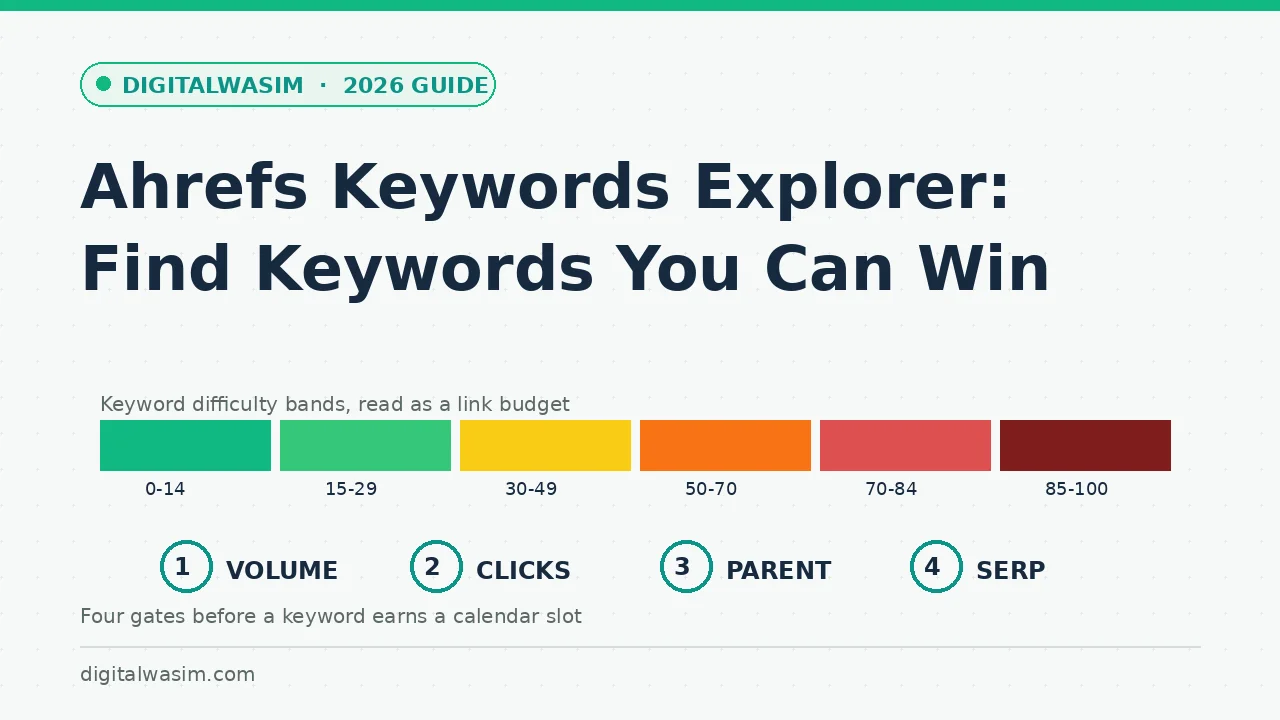
The difficulty scale divides into six bands, and each band implies a different strategy for a site of your size. Here is the honest interpretation, not the optimistic one:
| KD band | Label | What it means for a small blog |
|---|---|---|
| 0-14 | Very Easy | Usually rankable with a well-structured post and patience |
| 15-29 | Easy | Needs a handful of decent links; the new-blog sweet spot |
| 30-49 | Medium | Realistic after your first 20-30 quality posts |
| 50-70 | Hard | Site-level authority required; cluster play, not one post |
| 70-84 | Super Hard | Months of promotion and a strong domain behind it |
| 85-100 | Extremely Hard | Full team campaigns; treat as a long-term milestone |
Two cautions keep the bands honest. First, a very easy score can still hide a SERP full of major brands answering with thin pages, so always look at who actually ranks. Second, difficulty refreshes as the top ten changes, meaning a keyword that was easy last year may have hardened. The number starts the conversation; the SERP overview finishes it.
Every keyword decision is really a triangle of three numbers, and reading only one corner gets blogs hurt. Volume says demand exists, difficulty says what entry costs, and traffic potential says what the top slot actually collects. A keyword with 6,000 searches, difficulty 8, and a traffic potential of 300 is probably a no-click query wearing a mask, while a 900-search keyword with difficulty 12 and a traffic potential of 2,400 is a cluster leader in disguise. Train yourself to read the three together, and the tool starts recommending different posts than your volume-sorted instincts would.
Matching Terms and the Parent Topic Shortcut
The matching terms report is where volume hunting happens properly. Below the overview, the matching terms view lists every query containing your seed phrase, filterable by volume range and difficulty. The efficient pattern is to filter for difficulty under 30 and volume above 300, then scan for commercial or practical terms rather than informational fragments. Ten minutes of this beats hours of alphabet-soup expansion because the filters enforce your site's reality before your ego gets involved.
Parent topic is the feature that saves you from yourself. Click it on a promising keyword and Ahrefs shows the broader query that the current first-page leader actually optimizes for. A keyword like "instagram image size 2026" belongs to the parent topic "instagram image size," and one comprehensive post can capture the whole family. Bloggers who skip this step write five overlapping posts that compete with each other and watch all five underperform, which is the most common self-inflicted wound in content planning.
The related terms and search suggestions reports finish the expansion phase. Related terms surface queries that do not literally contain your seed, which is where adjacent intents and comparison angles hide, while search suggestions mirror what real autocomplete users type, including the question-shaped queries that make excellent FAQ sections. A practical loop runs all three reports into one working list, deduplicates by parent topic, then applies the difficulty and volume filters once. Twenty minutes of this produces a shortlist that would have taken an evening with manual autocomplete typing, and the shortlist arrives pre-grouped into article-sized clusters.
The SERP Overview: Where Weakness Hides
The SERP overview is the final gate before a keyword earns a slot in your calendar. Every top-ten result appears with its domain rating, page traffic, and the number of other keywords it ranks for. Weakness looks specific, and it repeats in three recognizable patterns worth hunting deliberately:
- The underperformer: a page earning a fraction of the keyword's traffic while holding a top position, which signals ranking inertia rather than quality.
- The stale incumbent: results dated years back with screenshots and prices from another era of the tool or topic.
- The accidental ranker: a forum thread, a glossary fragment, or a homepage squatting on an informational query with no real answer.
Intent mismatch is the strongest weakness signal of all. When a navigational or comparison SERP gets attacked by a how-to, the incumbent holds its position mainly through inertia. Your job is to notice the mismatch, confirm it with the People Also Ask boxes and related terms, and write the version the searcher actually wanted. That is the entire art of finding keywords you can win against nominally stronger sites, and it works precisely because most competitors publish without reading the SERP.
Geography and seasonality are the last two readings most bloggers skip. The country split shows where searches come from, which matters if your audience is regional but the volume number is global, and it explains why a keyword looked enormous until you noticed eighty percent of it sits in markets you do not serve. Seasonality shows up when you compare recent volume against the multi-year curve: tax-season queries, holiday gift guides, and conference cycles all breathe annually. Publish seasonal content six to eight weeks before the curve rises, not as it peaks, or the post arrives after Google has already chosen its winners for the year. Together these two readings turn a flat keyword list into a calendar-aware plan, which is exactly what separates research from spreadsheet cosplay: one tells you what to write and when, the other just collects numbers.
The Four-Gate Workflow From Seed to Calendar Slot
Here is the compressed workflow from seed phrase to calendar slot, the sequence this whole guide expanded:
- Enter the seed keyword and note volume, clicks, and traffic potential together, never volume alone.
- Filter matching terms to difficulty you can absorb and scan for practical, commercially useful queries.
- Open parent topic on shortlisted keywords and merge anything one strong post would capture together.
- Read the SERP overview for each finalist and mark weakness signals: low-traffic incumbents, stale pages, intent mismatch.
- Assign survivors to your content plan with the primary keyword and its cluster written into the brief.
A short list of mistakes keeps the workflow from regressing. Exporting lists sorted by volume and skipping the SERP read is the classic relapse, and it quietly reintroduces every beginner error the tool was meant to prevent. Treating difficulty as a verdict rather than a link budget makes you chicken out of winnable medium-band keywords with weak incumbents. And ignoring the clicks metrics means occasionally committing three weekends to a keyword Google answers directly on the results page, the most demoralizing way to learn that lesson. Each mistake is one habit away from fixed: gates in order, every time, no exceptions for exciting numbers.
Ahrefs Site Audit walkthrough low-competition keyword finder guide on-page SEO checklist Search Console pro guide